Have you ever updated a Steam game only to find that the new version introduced bugs or removed features you loved? It is a common frustration for many gamers in the United States. Knowing how to revert Steam games to an older version can save your gaming experience. This guide provides essential information and step-by-step instructions. You will learn the best methods for accessing previous game builds, understanding potential limitations. We cover official Steam beta programs, using manifest IDs, and managing local file backups. Many popular titles frequently receive updates that can sometimes break mods or change game mechanics significantly. Our detailed advice helps you confidently navigate these challenges. Discover effective ways to roll back your favorite games today. This is crucial for players who value stability and specific game versions. Get back to enjoying your games the way you prefer.
What is the easiest way to revert a Steam game?
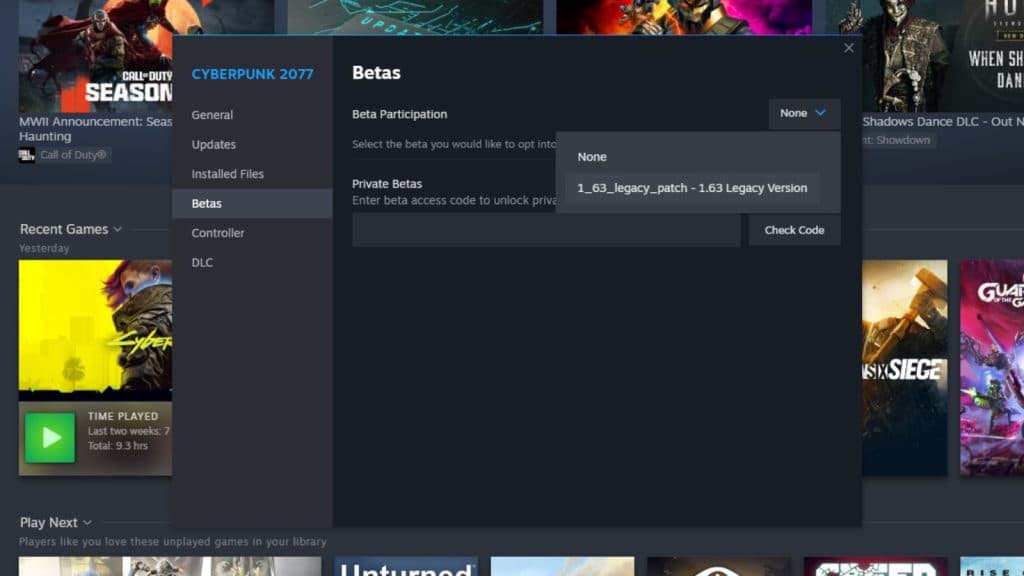
The easiest method involves using the game's 'Properties' within your Steam Library. Navigate to the 'Betas' tab and select an older version from the dropdown menu if available. This is the official and most straightforward approach provided by developers. It typically ensures stability and compatibility with your existing game files.
Can reverting a Steam game cause data loss?
While reverting itself is generally safe, it can cause issues with save files created on newer versions. Always back up your save data and game installation folder before attempting any reverts. This precaution prevents potential data loss or corruption, ensuring you can restore your progress if needed.
Are all older game versions available for reverting?
No, not all older game versions are universally available. Availability depends on the game developer's decision to maintain and offer past builds as beta branches or through other means. Some developers deprecate older versions entirely. Community resources like SteamDB can sometimes help locate manifest IDs for specific older builds.
How do Manifest IDs help in reverting Steam games?
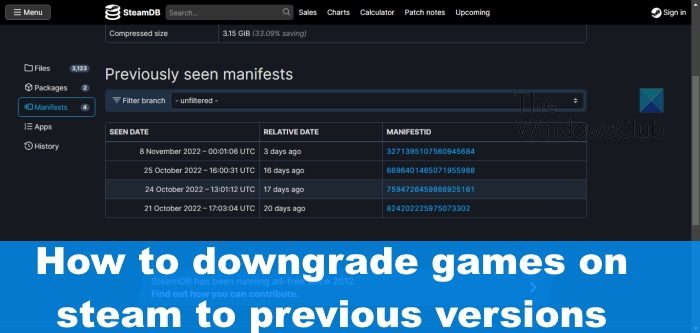
Manifest IDs are unique identifiers for specific game builds on Steam's content delivery network. Using the Steam console and these IDs, advanced users can force the download of a particular older version. This method is crucial when no official beta branch exists, providing a pathway to otherwise inaccessible game iterations.
Will reverting a game disable multiplayer features?
Reverting to an older game version might disable or limit multiplayer functionality. Many online games require all players to be on the latest version for server compatibility. If you revert, you may only be able to play offline or with others who have also reverted to that exact build. Always check the game's specific requirements.
Have you ever wished you could go back in time with your favorite Steam game? Perhaps a recent update introduced unwanted changes or broke your beloved mods. Understanding how to revert Steam games is a crucial skill for any dedicated player. This guide helps you navigate the process of reverting games to an older version on Steam. We will cover the what, why, and how of rolling back your game, providing clear steps for users in the United States and beyond. You will learn official and unofficial methods to ensure your gaming experience remains exactly as you like it. This information is vital for maintaining game stability and enjoying specific versions.
Reverting Steam games involves accessing specific tools within the Steam client or utilizing game file management techniques. Gamers in the United States often seek this knowledge for various reasons. These include fixing new bugs, restoring old features, or ensuring mod compatibility. It empowers you to control your gaming experience. Knowing how to revert Steam games is truly beneficial.
Understanding Why You Might Want to Revert Steam Games
Many players wonder why reverting a game is even necessary. Game developers constantly release updates. Sometimes these updates introduce unforeseen issues. A patch might break existing save files or change gameplay elements drastically. Learning how to revert Steam games helps you avoid such frustrations. It ensures your continued enjoyment.
How to Revert Steam Games Using Beta Branches
The simplest official method to revert Steam games is often through beta branches. Many developers offer older builds as beta options. This allows you to select a previous stable version. It is a straightforward process within Steam itself. You can usually find these options under a game's properties.
Here are the steps to revert Steam games using beta branches:
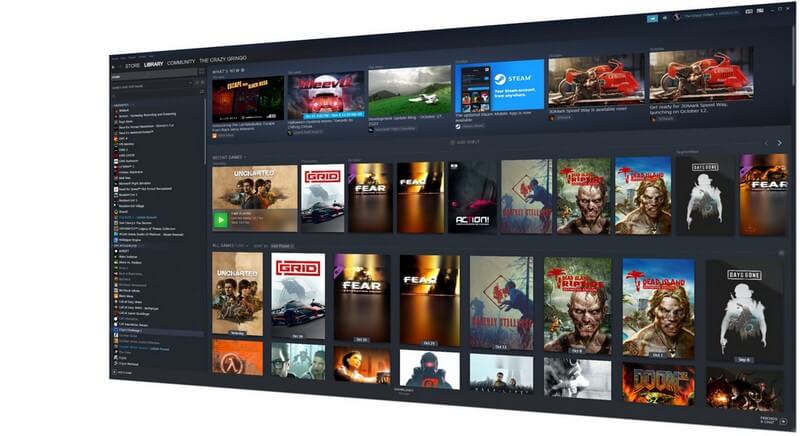
- Open your Steam client and go to your Library.
- Right-click on the game you wish to revert.
- Select 'Properties' from the context menu.
- Navigate to the 'Betas' tab on the left panel.
- From the dropdown menu, choose the older version or 'beta' you desire.
- Steam will then download the selected version.
- Restart Steam if the download does not begin automatically.
Advanced Methods How to Revert Steam Games with Manifest IDs
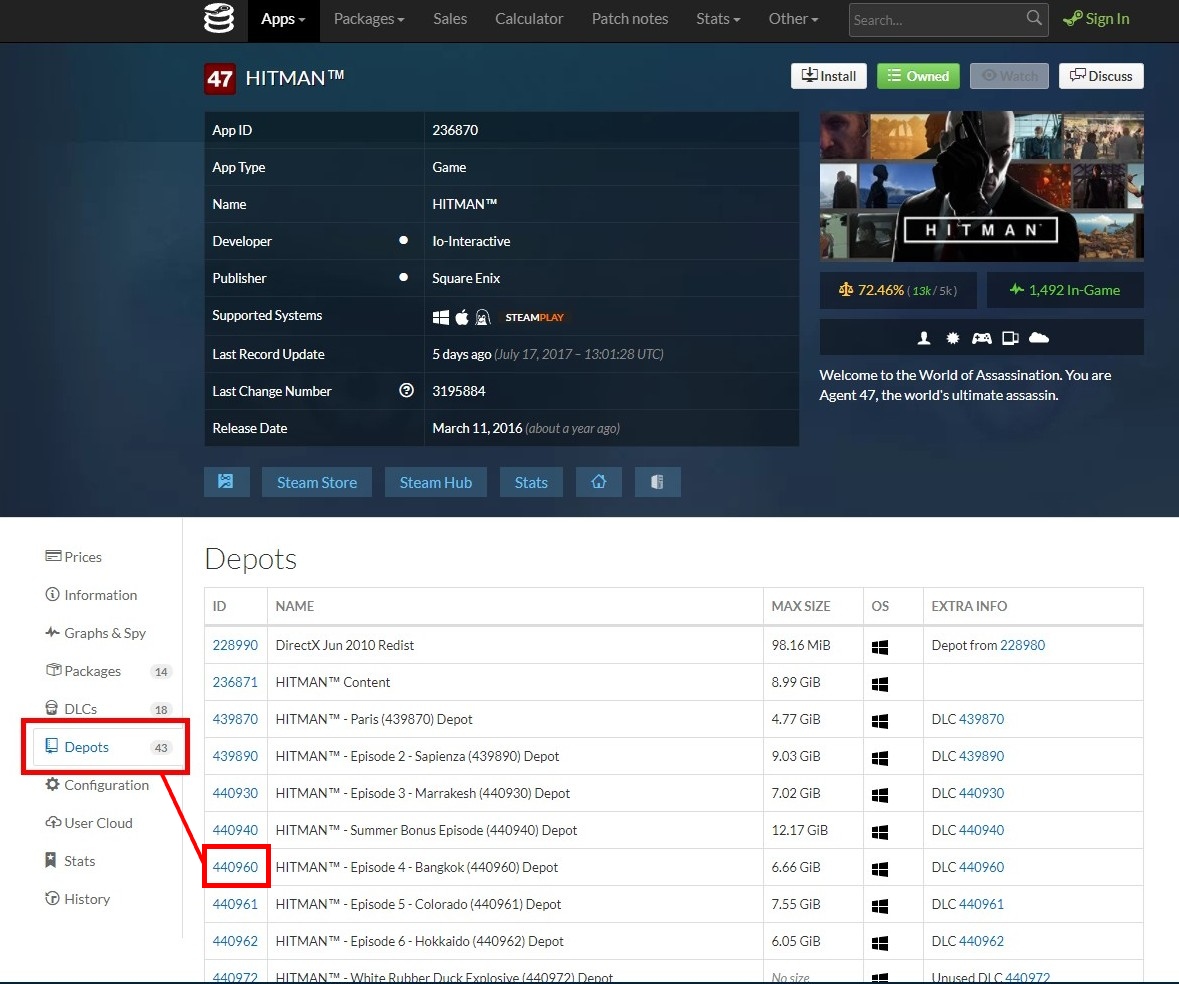
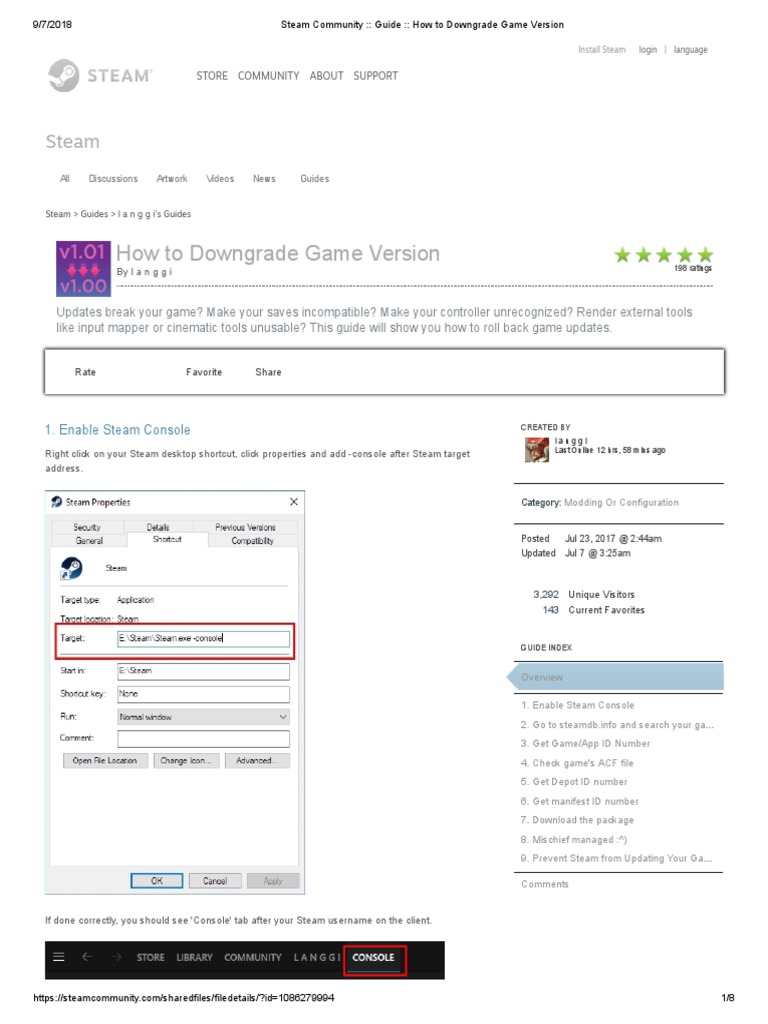
If a beta branch is not available, using Manifest IDs is a more advanced technique. This method requires a bit more technical know-how. It allows you to download very specific past versions of a game. This process involves using the Steam console. You will need the game's App ID and the Manifest ID for the desired build. This can be complex for beginners.
Here is a table outlining the information needed:
| Information Needed | Description | Example |
|---|---|---|
| Game App ID | Unique identifier for each Steam game. | 252490 for Rust |
| Depot ID | Identifier for specific game content. | 252491 for Rust's Windows content |
| Manifest ID | Unique ID for a specific build or version. | Found using SteamDB or console commands |
Protecting Your Progress How to Revert Steam Games with Backups
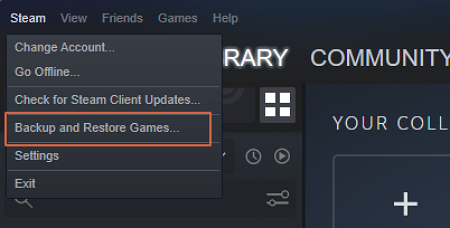
Prevention is often the best approach when considering how to revert Steam games. Regularly backing up your game files is highly recommended. This ensures you always have a working copy of your preferred version. You can manually copy the game's installation folder. Save it to an external drive or cloud storage. This method offers great peace of mind. You retain full control over your game history.
What Others Are Asking?
Can I revert any Steam game to an older version?
Not all Steam games offer official methods like beta branches for reverting. Availability depends on the developer's support. Some games maintain public beta branches or previous versions. Others might require more technical workarounds using manifest IDs. Community resources can often help find older builds.
Is it safe to revert Steam games?
Reverting Steam games is generally safe if done correctly through official means. Using beta branches poses minimal risk. However, manual file manipulation or third-party tools carry more risk. Always back up your game files and saves beforehand. This protects your data from corruption or loss.
Will reverting a Steam game affect my save files?
Reverting a Steam game can potentially affect your save files. Newer game versions might introduce save file format changes. An older game version may not be compatible with saves from a newer one. Always back up your save data separately. This ensures you can restore it if needed.
How do I find a game's Manifest ID for reverting Steam games?
Finding a game's Manifest ID often involves using the Steam console or websites like SteamDB. You activate the Steam console through the 'Run' command in Windows. Then you use specific commands like 'download_depot' with the game's App ID and Depot ID. SteamDB provides a public archive of many game manifests. These resources are invaluable for advanced users.
What if I cannot find a beta option to revert Steam games?
If a beta option is unavailable, you have other avenues to explore for reverting. Consider checking community forums for the game. Players often share methods or links to older builds. The manifest ID method is also a powerful alternative. This might be your best option for more obscure versions. Remember to back up everything first.
FAQ How to Revert Steam Games
What is reverting Steam games?
Reverting Steam games means rolling back an installed game to an earlier version. This helps fix issues caused by new updates. It restores preferred gameplay features. Many players find this essential.
Who might need to revert Steam games?
Players who encounter bugs, compatibility issues, or unwanted changes after a game update might need to revert. Mod users often revert to ensure their mods remain functional. It is for anyone seeking stability.
Why is reverting Steam games important?
It is important because it gives players control over their gaming experience. You can avoid game-breaking updates. It preserves specific versions for modding or competitive play. This extends game longevity for many.
How do I revert Steam games easily?
The easiest way to revert Steam games is by checking the game's 'Properties' in your Steam Library. Look for the 'Betas' tab. Select an available older build from the dropdown menu. This method is straightforward and official.
Where can I find resources about how to revert Steam games?
You can find resources on Steam community forums, developer websites, and gaming wikis. Websites like SteamDB provide manifest information. Many online guides offer detailed instructions for specific games. These are great starting points.
Reverting Steam games allows you to play older versions, fix compatibility issues, restore preferred game mechanics, and use specific mods. It involves accessing beta branches, using manifest IDs, or restoring local backups to enjoy past game iterations.
35



How To Revert To An Older Version Of A Steam Game Steam Console . How To Revert Back To An Older Version Of A Game On Steam Full 2025 . How To Revert Back To An Older Version Of A Game On Steam YouTube . How To Easily Refund Games On Steam Full Tutorial YouTube . How To Downgrade Any Game On Steam YouTube
:max_bytes(150000):strip_icc()/A5-ReturnaGameonSteam-annotated-0a5e363a5de64883947b5cbb7b850d27.jpg)

:max_bytes(150000):strip_icc()/A3-ReturnaGameonSteam-annotated-cc7b3e79a38a4bea9a3e779111d33905.jpg)

How To Backup And Restore 7 Days To Die Save 2026 Detailed Guide EaseUS Click Steam To Backup Restore . How To Return A Game On Steam A5 Annotated . How To Revert Back To An Older Version Of A Game On Steam YouTube . How To Return A Game On Steam A3 Annotated . How To Revert A Game Version On Roblox 2026 Update YouTube

How To Revert Back To An Older Version Of A Game On Steam Full 2024 . How To Refund Games On Steam 2025 Refund A Steam Game YouTube . How To Downgrade Steam Games The Tech Edvocate Steam 660x400 . How To Downgrade Steam Games Steam Not Recognizing Installed Games 1 . How To Downgrade Steam Games To Previous Versions How To Downgrade Games On Steam To Previous Versions


Cyberpunk 2077 How To Revert To An Earlier Version After 2 0 Update Cyberpunk 2077 Steam 1024x576 . How To Downgrade Steam Games To Previous Versions Artofit . How To Downgrade Steam Games To Previous Versions Steam Beta 500x318 . Steam Sale 2026 Key Dates You Need To Know LevelUpTalk Steam Sale Schedule 2026 08 27 2025 7c35051e 2c22 4093 96f1. Top 10 Most Anticipated Games Of 2026 What To Watch Out For GAMES IN 2026


How To Roll Back Game Version On Steam Daves Computer Tips Steam Library . How To Downgrade Steam Games To Previous Versions Steam Game Betas 300x158 . Steam Sales 2026 Calendrier Toutes Les Dates Meilleures Offres De All Steam Events 2026 1.webp. My Current Steam Wishlist 2025 2026 New Games YouTube . Steam Community Guide How To Downgrade Game Version




Lenovo Legion Go S Steam OS Warranty Sep 2026 Video Gaming Video Lenovo Legion Go S Steam Os 1763541404 2dcc81b2 Progressive . Nintendo S 2025 Has Been All About The Hardware But 2026 Is Going To . Steam Next Fest 2026 And Beyond All The Dates Details And Everything . How To Downgrade Any Game From Steam Tutorial YouTube Hqdefault . How To Downgrade Game Version On Steam Easiest Way YouTube




Steam Next Fest 2026 And Beyond All The Dates Details And Everything . TOP 21 NEW Upcoming Games Of 2026 YouTube . Steam Community Guide How To Downgrade Game Version PDF 1. How To Revert Steam Update Steam Revert Game Update Tutorial YouTube . Aura 2026 Steam Games Sc10cx1